Compress a PDF to 200 KB
Runs on your device · Your file never leaves your device.
Preset to a 200 KB ceiling, which leaves more room for detail than the tighter 100 KB limit. Drop your PDF and download one that fits.
The compressor searches for the best quality under 200 KB rather than crushing the file, so the pages keep as much clarity as the limit allows — check the result before you submit.
If a document simply cannot reach the target, it is split into parts that each pass the limit rather than producing one unusable file.
Worked example: a measured run of this tool
We ran a 3-page scanned letter in English and Arabic (fictional) (539.3 KB) through this page in a browser, the way a visitor would, and checked what came out. The figures below were measured on the result, not estimated.
- Settings
- The page’s preset: 200 KB, Compress mode. Nothing else was changed. The tool counts 1 KB as 1,000 bytes. The limit is a ceiling: when the tool’s best quality already fits well under it, that is the file you get.
- File size
- 539.3 KB → 174.6 KB (≤ 200.0 KB)
- Pages
- 3 → 3
- Opens as a valid file
- ✓
- English words present in the English lines (any order)
- 100 % (71 / 71) → 100 % (71 / 71)
- English text as written, in reading order
- 99.8 % → 99.8 %
- Numbers, totals and dates on their own line, English
- 5 / 5 → 5 / 5
- Arabic words present in the Arabic lines (any order)
- 95.2 % (60 / 63) → 93.7 % (59 / 63)
- Arabic text as written, in reading order
- 97.3 % → 94.6 %
- Numbers, totals and dates on their own line, Arabic
- 5 / 5 → 4 / 5 · ٠١٠٠٥٥٥٠١٩٩ → .١٠٠١000-199 — check failed
- Time taken in the test browser, button to result
- 1.3 s
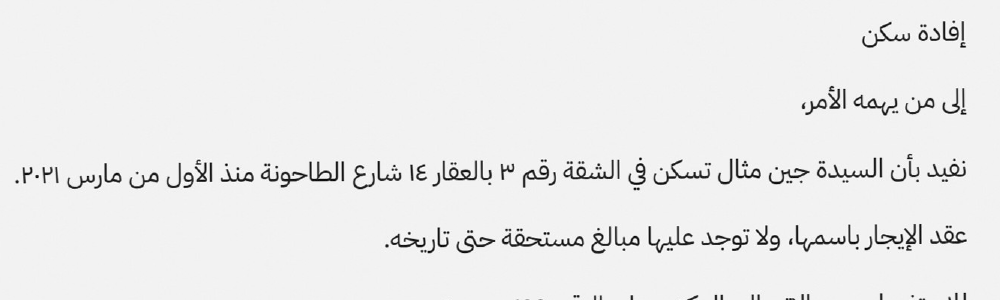
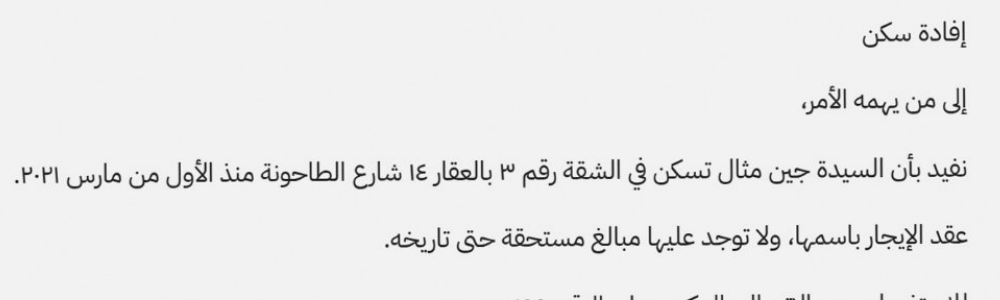
What this example does not show: To reach the size, every page becomes an image, so the text in the result cannot be selected or searched. Text recognition was run on the original and on the result, and the rows above show what it read in each: compression can cost some of the numbers on the Arabic page. The sample is three greyscale scanned pages; more pages or colour photographs need more room, and when a file cannot fit, the tool says so instead of handing over a file that is too big. The same tool’s Split mode then cuts it into parts that each fit.
Measured on 2026-10-04 with the site’s own code (build 5a72bc1). Files: scanned-letter-3-pages.pdf result
How to compress a PDF to 200 KB
- Add your PDF.
- The target is preset to 200 KB; adjust only if your form allows a different size.
- Press Compress and download the result, or the parts if it had to be split.
Supported formats and limits
- Input
- PDF (any version)
- Output
- PDF under 200 KB
- Targets
- 200 KB default; any value
- Where it runs
- In your browser; nothing uploaded
Not for: Keeping selectable text — an exact size target rasterises the pages.
Frequently asked questions
- Are my files uploaded to a server?
- No. This conversion runs inside your browser using your own device’s processing power, and the file is not uploaded. Once a tool has been used once (video, text recognition and background removal download their engine from this site the first time), it keeps working when your connection drops.
- Will the text stay selectable?
- Compression re-renders pages as images to hit a hard size target, so the output is a visual PDF. That is the trade-off that makes an exact limit achievable.
- My scanned PDF will not reach 200 KB — why?
- Scanned pages are photographs and need far more data than text to stay readable. Remove pages you do not need, or accept a slightly softer result.
Related tools
This page in other languages: العربية