PDF to Excel
Runs on your device · Your file never leaves your device.
Drop a PDF with tables — a bank statement, a price list, an invoice, a results sheet — and get an .xlsx workbook with one sheet per table and real cells you can sort and sum. Numbers are written as numbers, not text, so formulas work at once.
Tables are found by the way their words line up in columns across lines, which is how a person sees a table on the page. Where a page has no ruled table, every line is split at its column gaps into a row instead, so a statement or a list still comes out as a grid rather than a blob of text. Right-to-left sheets are marked so Excel shows Arabic tables the right way round.
Everything runs on your device. The PDF is never uploaded — a bank statement should not pass through a stranger’s server to become a spreadsheet.
Worked example: a measured run of this tool
We ran a one-page invoice PDF with a table of line items (fictional) (24.0 KB) through this page in a browser, the way a visitor would, and checked what came out. The figures below were measured on the result, not estimated.
- Settings
- The page’s defaults: one PDF, tables to sheets.
- Line-item values found in their own row
- 18 / 18
- Amounts stored as numbers
- 18 / 18
- Sum of the line totals in the sheet = total printed on the invoice
- 405.8 = 405.8 (6 / 6)
- Time taken in the test browser, button to result
- 0.5 s
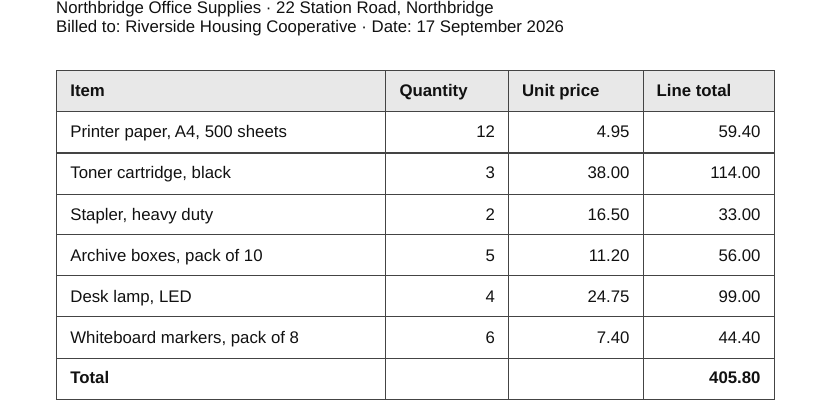
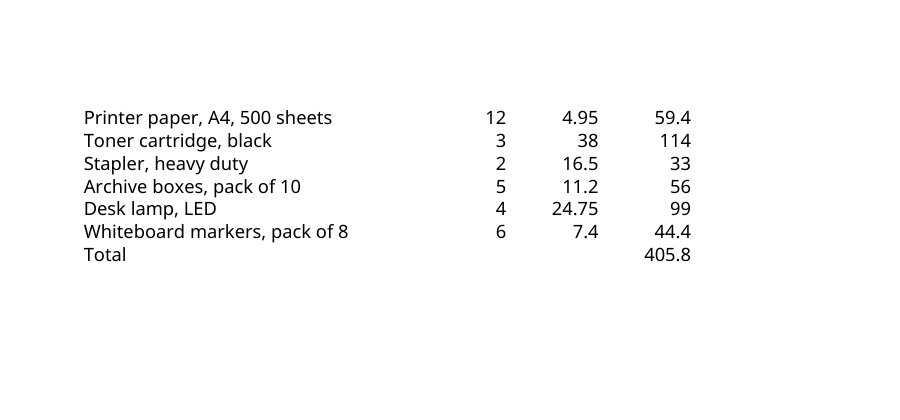
What this example does not show: This invoice is a text PDF with a ruled table. A scanned invoice has no text layer and cannot be read this way; statements without ruled columns come out as rows that may need tidying.
Measured on 2026-09-25 with the site’s own code (build 8672737). Files: office-supplies-invoice.pdf result
How to convert PDF to Excel
- Add the PDF.
- Press Convert to Excel.
- Open the .xlsx — one sheet per table.
Supported formats and limits
- Input
- PDF with a text layer (statements, invoices, price lists, reports)
- Output
- Excel workbook (.xlsx), one sheet per table, numbers as numbers
- Scripts
- Latin and Arabic tables; right-to-left sheets marked
- Where it runs
- In your browser; the file is never uploaded
Not for: Scanned PDFs — OCR them first. Tables drawn as images cannot be read either.
Frequently asked questions
- Is my file uploaded to a server?
- No. The conversion runs inside your browser on your own device. The file never leaves your computer or phone, which is also why the tool keeps working when the connection drops.
- My scanned bank statement gives an empty sheet
- A scan has no text layer to read. Run it through PDF OCR first to get a text PDF, or use the Arabic OCR tool for Arabic statements, then convert the result here.
- Columns are merged or split in the wrong place
- The converter finds columns from the gaps between words. Tables with very narrow gaps, or cells that wrap to two lines, can land in the wrong column; fix those cells in Excel — the numbers themselves are right.
- Does it keep formulas?
- A PDF has no formulas, only printed values. You get the values; add formulas in Excel.
- Does it work with Arabic tables?
- Yes. Arabic text is read in logical order, and sheets built from right-to-left pages open right-to-left in Excel.
Related tools
This page in other languages: العربية · Deutsch · Français · Español · Русский · Português · 中文 · हिन्दी · Türkçe · עברית · فارسی · اردو · Bahasa Indonesia · বাংলা