Convert PDF to Word
Runs on your device · Your file never leaves your device.
Drop a PDF and get back a .docx file you can edit in Word, Google Docs or Pages. The text layer is extracted page by page directly in your browser, so even long documents convert without waiting on a server queue.
This converter extracts the text content of the PDF. It does not attempt to rebuild the original page layout pixel for pixel — columns, floating text boxes and complex tables come through as readable paragraphs in document order rather than as an exact visual replica. For documents that are mostly prose (reports, letters, contracts, papers) that is usually exactly what you want, because the result is genuinely editable rather than a locked picture of a page.
Arabic, Hebrew and other right-to-left scripts are preserved in the correct reading order, and mixed Arabic/English paragraphs keep their direction. If your PDF is a scan (a photo of a page with no text layer), the text cannot be extracted this way — you need OCR instead, which reads the letters out of the image.
Worked example: a measured run of this tool
We ran a text PDF report in English and Arabic, with a table (fictional) (51.5 KB) through this page in a browser, the way a visitor would, and checked what came out. The figures below were measured on the result, not estimated.
- Settings
- The page’s defaults: PDF to DOCX, one file.
- English words present in the English lines (any order)
- 100 % (65 / 65)
- English text as written, in reading order
- 100 %
- Numbers, totals and dates on their own line, English
- 4 / 4
- Arabic words present in the Arabic lines (any order)
- 100 % (50 / 50)
- Arabic text as written, in reading order
- 99.3 %
- Numbers, totals and dates on their own line, Arabic
- 3 / 3
- Table rebuilt as a Word table (cells carried over)
- ✓ 16 / 16
- Arabic paragraphs set right-to-left
- 3 / 3
- Time taken in the test browser, button to result
- 0.6 s
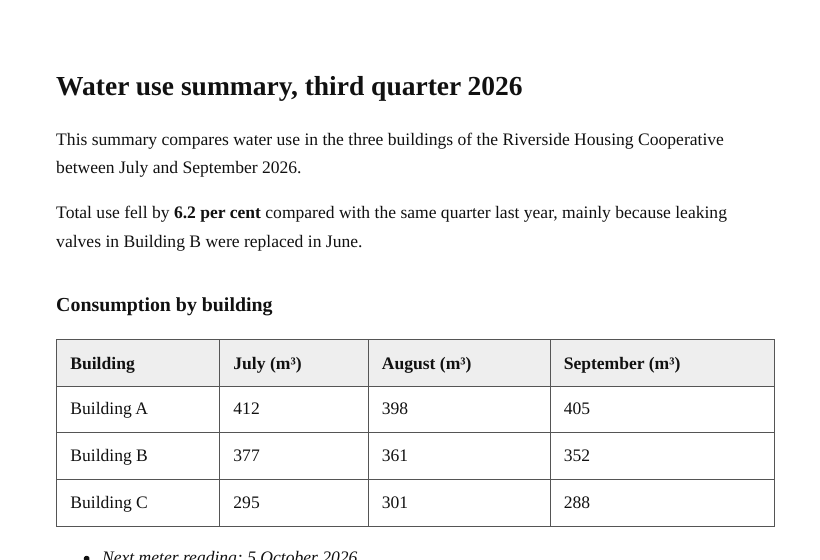
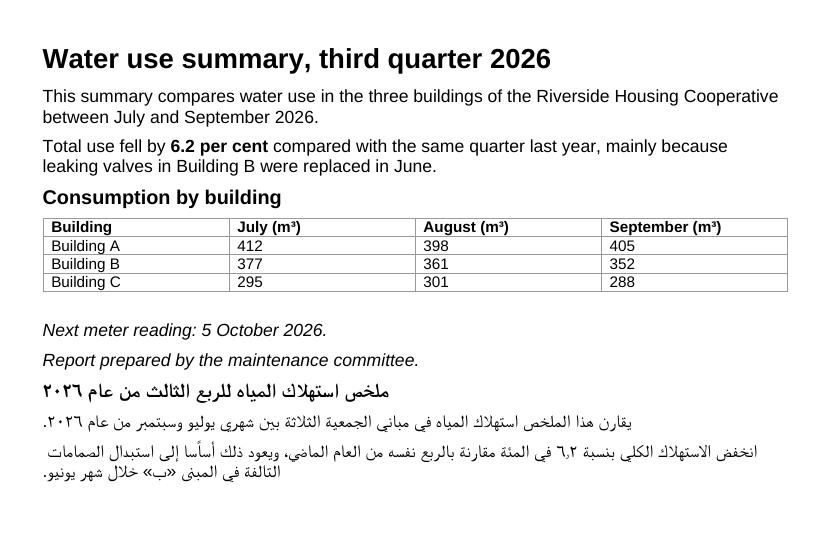
What this example does not show: This report is a text PDF with a heading, a table, a list and two languages. A scanned PDF has no text layer and needs PDF OCR first. Pages laid out in several columns or with floating boxes come through as paragraphs in reading order, not as an exact copy of the page.
Measured on 2026-09-25 with the site’s own code (build 8672737). Files: water-report-en-ar.pdf result
How to convert PDF to Word
- Drop a PDF that has real text (not a scan).
- Press Convert All; the text is extracted page by page in your browser.
- Download the .docx and open it in Word, Google Docs or Pages to edit.
Supported formats and limits
- Input
- PDF with a text layer
- Output
- Editable Word .docx
- Languages
- Arabic, English and mixed, in reading order
- Where it runs
- In your browser; nothing uploaded
Not for: Scanned PDFs (use the OCR tool) and magazine-style multi-column layouts, which come out as reading-order blocks rather than an exact replica.
What carries over into the Word file, and what does not
Each PDF page becomes its own page in the document, separated by a page break. Text keeps its point size, and bold and italic are read from the fonts the PDF uses. A line or two set clearly larger than the body text becomes a real Word heading (Heading 1, 2 or 3, depending on how much larger), so the navigation pane and an automatic table of contents work.
Some things do not carry over. All text is set in Arial, whatever typeface the PDF used, and text colour is not kept. Links, comments and form fields are not read. Charts and logos drawn as lines and shapes, rather than stored as pictures, do not appear, although the words inside them come through as text. Page numbers and running headers arrive as ordinary lines, ready to delete.
How tables and pictures are rebuilt
Tables are found from how the words line up, not from drawn borders. When consecutive lines each split into groups of words at the same horizontal positions, they become a Word table, with the first row in bold and marked as the header row. A cell whose text wraps onto a second line can end the table early, so check longer tables by eye.
Pictures stored in the PDF go back into the reading order at their original size, scaled down only when wider than six and a half inches. They are saved as PNG, which keeps them sharp but can make the Word file larger than the PDF when it holds photographs.
Locked PDFs and files that come back without text
Many password-protected PDFs only restrict editing or printing; these convert without asking for anything. If a file needs a password to open, a box asks for it, and the password is remembered for that one file while the tab stays open, so a retry does not ask again.
If the result has no text you can edit, either blank or only pictures of the pages, the PDF is a scan. PDF OCR (/pdf-ocr) recognises the letters in those images and offers a Word download.
When Word is not the best destination
For a bank statement or invoice where you want to work with the numbers, PDF to Excel (/pdf-to-excel) uses the same table detection, puts each table on its own sheet, and stores amounts such as 1,250.00 or 1.250,00 as numbers you can add up. If you only need the words, PDF to Text (/pdf-to-text) gives the same reading order as plain text. You can also drop several PDFs, or a zip of them, and each comes back as its own .docx file.
Frequently asked questions
- Can it convert a PDF to Word with OCR?
- This page reads the text a PDF already contains. For a scanned PDF — a photo of a page — use PDF OCR, which recognises the letters from the image and gives you an editable Word file, in any of 15 languages, including Arabic and English mixed on one page.
- Are my files uploaded to a server?
- No. This conversion runs inside your browser using your own device’s processing power, and the file is not uploaded. Once a tool has been used once (video, text recognition and background removal download their engine from this site the first time), it keeps working when your connection drops.
- Will the Word file look exactly like the PDF?
- Not pixel for pixel, but the structure survives: headings by size, bold and italic, left, centred and right alignment, right-to-left paragraphs for Arabic, Hebrew, Persian and Urdu, embedded images at their place in the flow, and simple tables rebuilt as real Word tables. Multi-column magazine layouts and heavily designed pages come out as readable blocks rather than an exact replica.
- Why is my converted document empty?
- The PDF is almost certainly a scan — an image of a page with no underlying text. Nothing can be extracted from it without OCR, which recognises the characters in the picture.
Related tools
This page in other languages: العربية · Deutsch · Français · Español · Русский · Português · 中文 · हिन्दी · Türkçe · עברית · فارسی · اردو · Bahasa Indonesia · বাংলা