Runs on your device · Your file never leaves your device.
Read the words out of a photograph, screenshot or scan and get text you can edit, search and copy. Choose English, Arabic, or both at once for mixed documents.
Arabic OCR is the part most free tools do badly or not at all. Recognised Arabic is displayed right-to-left and exported to Word with the proper bidirectional settings, so it opens correctly rather than reversed.
The first run downloads the recognition model for the language you picked — around 15 MB for Arabic — after which your browser caches it. Your image itself is never uploaded: recognition happens on your own device.
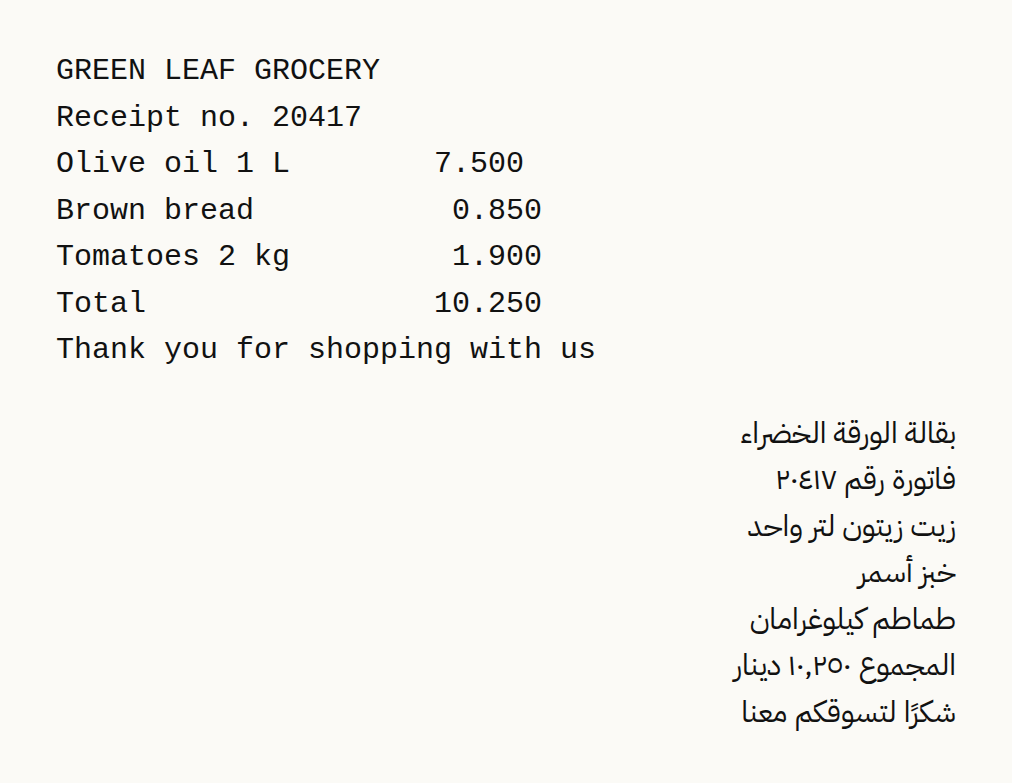
We ran a shop receipt image in English and Arabic (fictional) (62.1 KB) through this page in a browser, the way a visitor would, and checked what came out. The figures below were measured on the result, not estimated.
What this example does not show: This is a clean, straight image of printed text. Photos taken at an angle, handwriting and faint print are read less well. Check names and numbers by eye before you rely on them.
Measured on 2026-09-25 with the site’s own code (build 8672737). Files: grocery-receipt-ar-en.png result
Not for: Handwriting and heavily stylised text — recognition is reliable on clear printed text, less so otherwise.
The list has 17 settings: English, Arabic, Arabic and English together, German, French, Spanish, Russian, Portuguese, Simplified and Traditional Chinese, Hindi, Turkish, Hebrew, Persian, Urdu, Indonesian and Bangla. Each one loads the recognition model for that language, so choose the language the text is written in, not the language of this page. Text read with the wrong model comes out as wrong or meaningless characters.
The setting also changes how the text is laid out. For left-to-right languages, runs of spaces are kept, so the columns of a receipt or a simple table stay apart. For right-to-left languages this is switched off, because in tests it joined neighbouring words together. When Arabic is selected, numbers written in Arabic-Indic digits get a second reading, because the engine often misreads them on the first.
An empty file, or one the browser cannot open, stops with a message saying so. An iPhone HEIC photo is converted to JPG on your device. The engine reads small text poorly, so a picture narrower than 1,600 pixels is enlarged to about 1,800 pixels wide before it is read, at most four times its size and no more than 4,000 pixels on the longest side.
Several pictures can be read in one go; in the text, each one starts with a line naming its file, and in the Word file each sits under its own heading.
The confidence percentage is the engine's own estimate, averaged over all the pictures. It is not a comparison with the real text, so read numbers, names and amounts again before you rely on them.
The TXT file is saved as UTF-8 with a byte-order mark, which helps Windows Notepad display non-Latin letters correctly. In the Word file every line becomes its own paragraph. With a right-to-left setting (Arabic, Hebrew, Persian or Urdu), those paragraphs are set right to left and right-aligned, and in a mixed document the direction is decided line by line, so English lines stay left-aligned.
A file of 0 bytes usually means a photo kept in cloud storage that has not downloaded to the phone yet: open it in your gallery, then choose it again. A picture opened straight from a messaging app sometimes cannot be read; save it to the phone first, or take a screenshot of it.
A tilted photo reads worse than a straight one. Straighten it with /rotate-image and cut away everything except the text with /crop-image. For a scanned PDF, use /pdf-ocr, which turns every page into a picture and reads each one.
This page in other languages: العربية · Deutsch · Français · Español · Русский · Português · 中文 · हिन्दी · Türkçe · עברית · فارسی · اردو · Bahasa Indonesia · বাংলা